
VertiTab Overview
VertiTab Overview
Section titled “VertiTab Overview”VertiTab is a vertical tab manager designed specifically for browser sidebars, offering 20+ innovative features such as vertical tab layouts, smart tab grouping, and tab snapshots. It helps you efficiently manage a large number of tabs, improve focus, and enhance your browsing experience.
Ways to Use

Section titled “Ways to Use”🎯 Chrome Sidebar (Recommended)
Section titled “🎯 Chrome Sidebar (Recommended)”::: tip Settings
Options Page > Appearance > Click extension icon action > Open SidePanel
:::
-
Perfectly fits the native Chrome sidebar to display tabs vertically
-
Makes full use of wide screens, providing a more intuitive tab management experience
-
Supports custom themes and layouts for a personalized sidebar experience
⚡ Quick Popup

Section titled “⚡ Quick Popup”::: tip Settings
Options Page > Appearance > Click extension icon action > Open Popup
:::
-
Quickly open the tab manager by clicking the extension icon
-
Ideal for temporary operations, supporting keyboard shortcuts to improve efficiency
🪟 Independent Pop-up Window (Added in v3.1.0)

Section titled “🪟 Independent Pop-up Window (Added in v3.1.0)”::: tip Settings
Options Page > Appearance > Click extension icon action > Open new pop-up window
:::
- Open the tab manager in a new pop-up window, providing more operational space
- Independent window can be freely resized, suitable for users who need more display area
- Supports multitasking operations, managing tabs without affecting the main browser window
💡 Web Sidebar
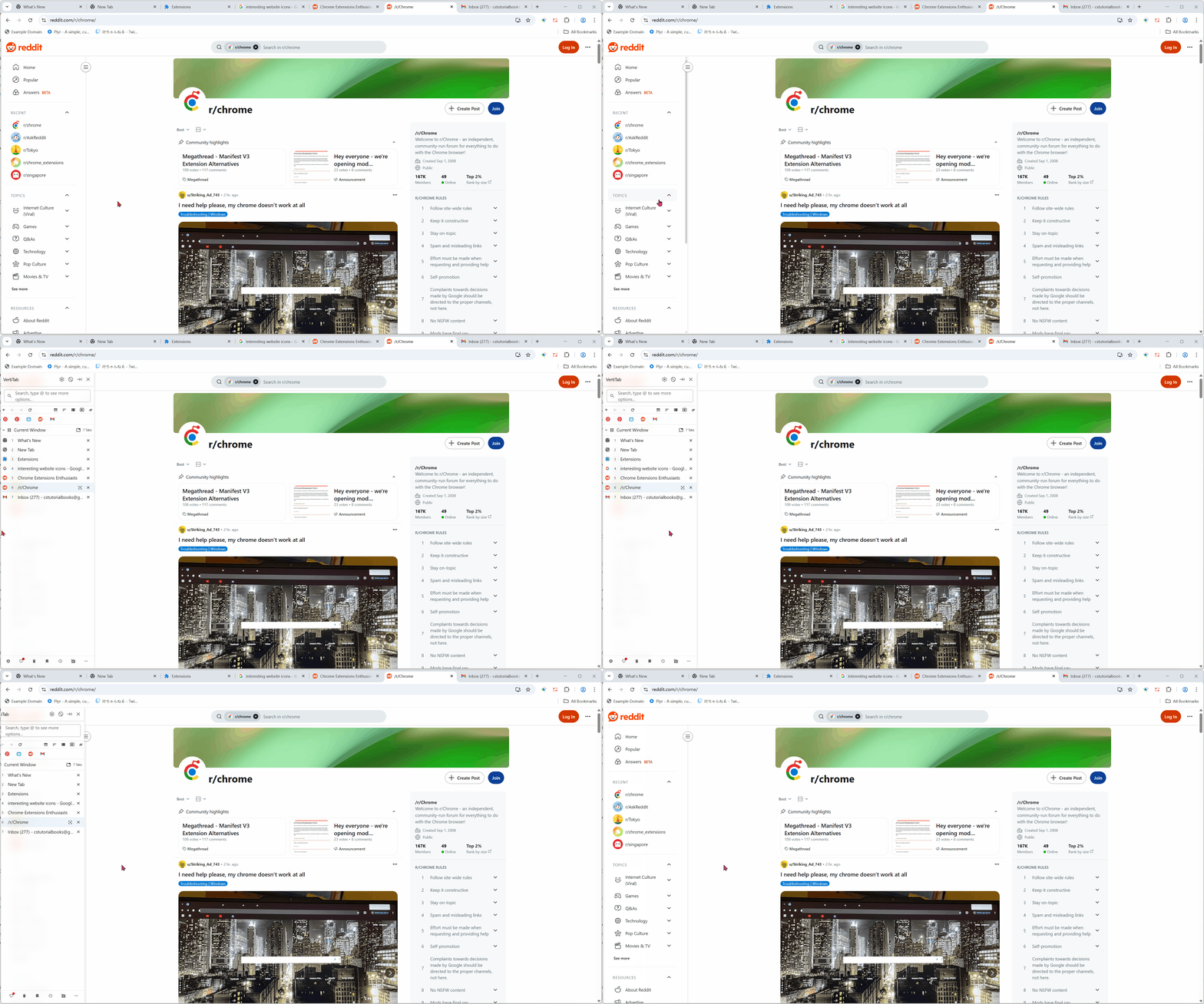
Section titled “💡 Web Sidebar”::: tip Tips
This Feature is only triggered when the side panel is not open. Opening the side panel will disable this Feature. :::
-
Activate the vertical tab bar on any webpage
-
Customizable position and trigger method, with drag-to-adjust width for an immersive browsing experience
::: tip Tips
Due to security and privacy restrictions, the web sidebar doesn’t work on the following types of pages:
- Browser extension stores (such as the Chrome Web Store, Microsoft Edge add-ons)
- Internal browser pages (starting with chrome://, edge://, or about://)
- Local files on your computer (starting with file://)
- Pages from other browser extensions (starting with chrome-extension:// or extension://, or similar)
- Websites with a strict Content Security Policy
- The New Tab page (starting with chrome://newtab/ or edge://newtab/, or similar)
- The built-in PDF viewer page
:::
Core Features
Section titled “Core Features”Tab Management
Section titled “Tab Management”- Tab Operations: Close duplicate tabs, tab previews
- Vertical Tab Layout: Tree-style tab hierarchy, automatic site-based categorization, compact list mode, window tab management
- Smart Tab Grouping: AI-driven grouping, custom rules, batch operations, one-click tab organization
- Quick Tab Access: Pin frequently used tabs, bookmark important websites, manage groups of bookmarks
Browser Efficiency Tools
Section titled “Browser Efficiency Tools”- Tab Snapshots: Save entire work environments, record window layouts, switch between multiple snapshots, automatic backup and recovery
- Tab Performance Optimization: Automatically hibernate tabs, optimize memory usage, intelligent rule configuration
- Tab Search: Real-time search, fuzzy matching, history support, tab previews
- Multi-function Navigation Bar: Manage tabs, bookmarks, history, and more in one unified interface
- Website Custom Configurations: Auto-sleep, page keep-alive, privacy browsing, auto-refresh, etc.
Search Features
Section titled “Search Features”Multi-Source Search
Section titled “Multi-Source Search”- Search open tabs, recently closed tabs, history, bookmarks, and more
Search Engine Support
Section titled “Search Engine Support”- Supports Google, Bing, Yahoo, and other major search engines, with quick switching between search sources
AI Chat Integration
Section titled “AI Chat Integration”- Integrated with ChatGPT, Claude, and other mainstream AI models
- Automatically fills in the chat box and submits queries for you
Performance Optimization
Section titled “Performance Optimization”Auto Tab Management
Section titled “Auto Tab Management”- Auto Hibernate/Close: Set thresholds for auto-hibernation/closure and exclude specific websites via whitelist
- Smart rules to skip fixed tabs, media playback, form filling, etc.
Memory Optimization
Section titled “Memory Optimization”- Smart tab discard mechanism, lazy loading, performance monitoring
Data Sync
Section titled “Data Sync”- Cross-device syncing, automatic workspace backup, importing/exporting user preferences
User Interface Customization
Section titled “User Interface Customization”Custom Themes
Section titled “Custom Themes”- 24 built-in themes available for personalizing colors, fonts, and component styles according to your preferences
Browser Compatibility
Section titled “Browser Compatibility”Supported Platforms
Section titled “Supported Platforms”- Chrome, Edge, Firefox (139+), Opera
System Requirements
Section titled “System Requirements”- Chrome: Latest version
- Firefox: Version 139+ (supports native tab group API)
- Edge: Latest version
Permissions
Section titled “Permissions”Required Permissions
Section titled “Required Permissions”tabs: Manage and operate browser tabstabGroups: Manage and operate tab groupssidePanel: Manage and operate the sidebaralarms: Set and manage scheduled tasksstorage: Manage and operate local storagefavicon: Retrieve and display website icons
Optional Permissions
Section titled “Optional Permissions”readingList,cookies,history,search,bookmarks
Privacy Protection
Section titled “Privacy Protection”- All data is stored locally and only encrypted during data transfer when cloud sync or AI grouping is enabled
Premium Features
Section titled “Premium Features”VertiTab Premium offers powerful tools for users seeking maximum efficiency:
- Cloud Sync: Sync tabs, settings, and quick access across devices, with automatic backup and recovery
- Advanced Picture-in-Picture: Customizable video player supporting subtitles, comments, and progress preview thumbnails
- Advanced Customization: Custom action menus, tree menu settings, advanced tab focus configurations
- Advanced Tools: Tab history tracking, scheduled tasks (refresh, sleep, close), link open method settings, and enhanced bookmark management
Related Links
Section titled “Related Links”- 📝 Changelog
- ❓ FAQ
- 🔒 Privacy Policy
- 📜 Terms of Service
Why Choose VertiTab?
Section titled “Why Choose VertiTab?”- Professional Design: Optimized for Chrome sidebar, providing the best vertical tab management experience
- Flexible Use: Supports sidebar, quick popup, and web sidebar modes for managing tabs wherever you are
- Powerful Features: 20+ innovative features offering the most comprehensive tab management experience
- Smart Efficiency: AI-driven auto-grouping system that simplifies tab management
- Performance Optimization: Smart sleep mechanism ensures smooth browser performance at all times
- Data Security: Automatic workspace backups to ensure your work is never lost
VertiTab is a professional Chrome vertical tab manager that makes tab management easier and more efficient.